
What Are Automatic Properties in C#? Syntax & Examples
Introduction
As a software developer, if you have written a small C# program, you have probably seen code like this:
csharp
public string Name { get; set; }It looks simple, but beginners often ask: Is this a field? A method? What are get and set doing? Where is the variable that stores the value?
That line is an automatic properties in C# (also called an auto-implemented property). It is one of the most common features in C#, and you will see it in nearly every .NET application: ASP.NET Core models, Entity Framework entities, DTOs, and desktop apps.
In this article, you will learn:
- What properties are and why they exist
- What automatic properties are and what problem they solve
- How
get,set,private set, andinitdiffer - How to set default values and handle nullable reference types
- How properties support encapsulation in object-oriented programming
- Common mistakes, best practices, and interview questions
What Is a Property in C#?
A property is a class member that gives controlled access to data. From the outside, it looks like a field, but internally it works through special methods called accessors (get and set).
Let’s start with a field
A field is a variable declared inside a class:
C#
public class Student
{
    public string name;   // this is a FIELD
}
Anyone can read or change name with no rules:
C#
var student = new Student();
student.name = "";           // allowed, even though an empty name makes no sense
student.name = null;         // also allowed
Exposing fields directly is risky. You can’t validate the data, you can’t change how the data is stored later without breaking other code, and you lose control of your class.
The classic solution: private field + public property
The traditional approach keeps the field private and exposes a public property:
C#
public class Student
{
    private string _name = string.Empty;   // backing field (private)

    public string Name                     // property (public)
    {
        get { return _name; }              // runs when you READ the value
        set { _name = value; }             // runs when you WRITE a value
    }
}
Line by line:
| Line | Explanation |
|---|---|
private string _name = string.Empty; | A private backing field. It stores the actual data. Only code inside Student can touch it. |
public string Name | Declares a property called Name of type string. |
get { return _name; } | The getter. It runs when someone reads student.Name. |
set { _name = value; } | The setter. It runs when someone writes student.Name = "Ali". The keyword value holds the assigned value. |
Usage looks just like using a field:
C#
var student = new Student();
student.Name = "Ali";               // calls the setter
Console.WriteLine(student.Name);    // calls the getter
This works well, but writing a private field plus a property with trivial get/set for every piece of data quickly becomes repetitive. That is the problem automatic properties solve.
What Is an Automatic Property?
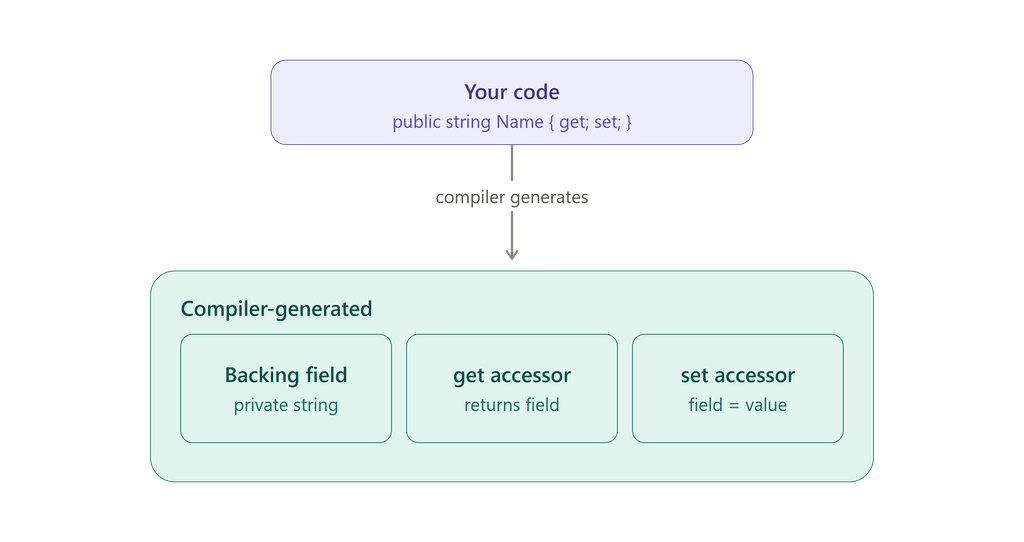
An automatic property is a property where you write only get and/or set without a body. The compiler automatically generates a hidden private backing field for you.
C#
public class Student
{
    public string Name { get; set; } = string.Empty;
    public int Age { get; set; }
}
Line by line:
| Line | Explanation |
|---|---|
public class Student | Declares a public class named Student. |
public string Name { get; set; } = string.Empty; | An automatic property. get; and set; have no bodies, so the compiler creates a hidden field and the accessor logic. = string.Empty is the initial value. |
public int Age { get; set; } | An automatic property of type int. Its default value is 0. |
Important: this is a property, not a field
public string Name { get; set; } is a property, even though it looks compact. A field would look like this:
C#
public string Name; // field: no { get; set; }The curly braces with get/set are what make it a property. The compiler still creates a private field behind the scenes, but you cannot access it directly by name.
What the compiler does behind the scenes
 Your code                          What the compiler generates
 ─────────────────────────         ──────────────────────────────────────────
 public string Name                private string <Name>k__BackingField;
     { get; set; }        ───►
                                   public string Name
                                   {
                                       get { return <Name>k__BackingField; }
                                       set { <Name>k__BackingField = value; }
                                   }
The odd field name <Name>k__BackingField is intentionally not a legal C# identifier, so you cannot use it accidentally.
Traditional vs. automatic: side by side
| Traditional property | Automatic property | |
|---|---|---|
| Backing field | You write it | Compiler generates it (hidden) |
| Lines of code | 8 or more | 1 |
| Custom logic in accessors | Yes | Not in the classic form |
| Best for | Validation, transformation, logging | Simple data storage |
Why Were Automatic Properties Introduced?
Automatic properties arrived in C# 3.0 (2007) to solve a real problem: boilerplate code.
Before them, a class with five simple data members needed five private fields and five properties, about 40 lines of repetitive code where most getters and setters did nothing except pass the value through.
Automatic properties give you:
- Less code: one line instead of eight.
- Better readability: your class shows its data at a glance.
- Future flexibility: you can later convert an automatic property into a traditional one (to add validation) without changing any calling code. This is not true for a public field, where changing to a property breaks binary compatibility and reflection-based tools.
- Framework compatibility: serializers, model binders, and ORMs like Entity Framework Core work with properties, not plain fields.
Understanding get and set Accessors
| Accessor | Purpose | When it runs |
|---|---|---|
get | Returns the property’s value | When code reads the property |
set | Assigns a new value | When code writes the property |
C#
var student = new Student();

student.Name = "Sara";                 // set accessor runs
string current = student.Name;         // get accessor runs
Console.WriteLine(current);            // Sara
Inside a traditional set, the implicit parameter value is the data being assigned. In an automatic property you never see it because the compiler handles it.
Read-Only Automatic Propertiesget; only (fully read-only)
C#
public class Employee
{
    public int Id { get; }

    public Employee(int id)
    {
        Id = id;   // allowed: inside the constructor
    }
}
Line by line:
public int Id { get; }has no setter, so the value can only be assigned in the constructor or by an initializer (= 5).Id = id;is legal here because constructors are allowed to initialize get-only properties.- Any assignment like
employee.Id = 10;elsewhere is a compile-time error.
Use this for values that must never change after the object is created, such as an ID or account number.
get; private set; (readable by everyone, writable only inside the class)
C#
public class BankAccount
{
    public decimal Balance { get; private set; }

    public void Deposit(decimal amount)
    {
        if (amount <= 0)
            throw new ArgumentOutOfRangeException(nameof(amount), "Deposit must be positive.");

        Balance += amount;   // allowed: inside the class
    }
}
Line by line:
public decimal Balance { get; private set; }: anyone can readBalance, but only code insideBankAccountcan change it.Deposit(...)validates the input, then updates the balance. This is the only controlled way to change it.- Outside code writing
account.Balance = 10000;fails to compile.
get; vs. get; private set;
| Syntax | Can be set in constructor? | Can be set in other methods of the class? |
|---|---|---|
{ get; } | ✅ Yes | ❌ No |
{ get; private set; } | ✅ Yes | ✅ Yes |
The init Accessor (C# 9+)
init lets a property be set only during object creation, using an object initializer, a constructor, or a with expression. After that, it becomes read-only.
C#
public class Address
{
    public required string Street { get; init; }
    public required string City { get; init; }
}
C#
var address = new Address
{
    Street = "12 Main Street",
    City = "Valletta"
};

// address.City = "Sliema";   // ❌ Error CS8852: init-only property
Line by line:
{ get; init; }: readable anytime, assignable only during initialization.required(C# 11+) forces the caller to set the property in the object initializer, otherwise the code will not compile.- The commented-out line would fail because the object is already created.
When is init useful?
- Immutable models and DTOs
- Configuration/options objects
- Values that should not change after creation but where you prefer object-initializer syntax over long constructors
- Thread-safety benefits (immutable objects are easier to share)
init vs. private set
private set lets the class change the value later (for example in Deposit). init allows changes only at creation time. Choose init for “set once, then frozen.”
Default (Initial) Values
You can assign a default value directly to an automatic property:
csharp
public class Product
{
    public string Name { get; set; } = "Sara";
    public bool IsActive { get; set; } = true;
    public DateTime CreatedAtUtc { get; } = DateTime.UtcNow;
    public List<string> Tags { get; } = new();
}
Line by line:
= "Sara": the initial value used unless someone overrides it.= true: new products start active.CreatedAtUtc { get; } = DateTime.UtcNow: a read-only property initialized once at object creation.Tags { get; } = new();: the list reference can never be replaced, but items inside the list can still be added or removed. Target-typednew()is valid in C# 9+.
If you provide no initializer, properties get the type’s default value:
| Type | Default |
|---|---|
int, decimal, double | 0 |
bool | true/false |
string, other reference types | null |
DateTime | 01/01/0001 00:00:00 |
Nullable Reference Types and Automatic Properties
Modern .NET projects enable nullable reference types (<Nullable>enable</Nullable>), so the compiler warns you about possible null values.
C#
public class Student
{
    public string Name { get; set; }      // ⚠️ Warning CS8618: non-nullable property
                                          //    must contain a non-null value when exiting constructor
}
Here string means “this should never be null,” yet nothing initializes it. There are three clean fixes:
C#
public class Student
{
    // 1. Give it a safe default
    public string Name { get; set; } = string.Empty;

    // 2. Mark it as optionally null
    public string? MiddleName { get; set; }

    // 3. Force callers to provide it (C# 11+)
    public required string Email { get; init; }
}
Line by line:
string Name ... = string.Empty: never null, starts as an empty string.string? MiddleName: the?explicitly says “this may be null,” and the compiler will warn you if you use it without a null check.required string Email: the compiler forces callers to supply a value when creating the object.
Comparison: Field vs. Property Types
| Feature | Field | Traditional property | Automatic property | Read-only property | init property |
|---|---|---|---|---|---|
| Example | public int age; | get { return _age; } set { _age = value; } | public int Age { get; set; } | public int Id { get; } | public int Id { get; init; } |
| Is it a property? | No | Yes | Yes | Yes | Yes |
| Backing field | Is the field | Written by you | Compiler-generated | Compiler-generated | Compiler-generated |
| Custom logic possible | No | Yes | No(classic form) | Yes/ No | Yes/ No |
| Can be set after creation | Yes | Yes | Yes | No (constructor only) | No (initialization only) |
| Works with data binding/serializers | Often not | Yes | Yes | Yes | Yes |
| Best use | Private internal state | Validation/logic | Simple data | IDs, constants | Immutable models |
Accessor combinations at a glance
| Declaration | Who can read | Who can write | When |
|---|---|---|---|
{ get; set; } | Everyone | Everyone | Anytime |
{ get; private set; } | Everyone | Only the class itself | Anytime, from inside |
{ get; protected set; } | Everyone | Class + derived classes | Anytime, from inside |
{ get; init; } | Everyone | Caller | Only during initialization |
{ get; } | Everyone | Constructor only | Only at construction |
Encapsulation: How Properties Support Object-Oriented Programming
Encapsulation means bundling data with the code that works on it, while hiding internal details and controlling access.
Properties are C#’s main tool for this:
- Hide the storage: the backing field is private.
- Control access: choose who can read and who can write.
- Protect invariants: validation ensures the object never enters an invalid state.
- Allow evolution: you can change how data is stored without breaking callers.
Compare the two designs:
csharp
//Weak encapsulation
public class BankAccountBad
{
    public decimal Balance;   // anyone can set this to anything
}

//Strong encapsulation
public class BankAccount
{
    public decimal Balance { get; private set; }

    public void Deposit(decimal amount)
    {
        if (amount <= 0)
            throw new ArgumentOutOfRangeException(nameof(amount));
        Balance += amount;
    }
}
In the second version, the only way to change money is through methods that enforce business rules.
Practical Real-World Examples
1. Student (simple data, automatic properties)
C#
public class Student
{
    public int Id { get; init; }
    public string FirstName { get; set; } = string.Empty;
    public string LastName { get; set; } = string.Empty;
    public string? Email { get; set; }
    public int Age { get; set; }
    public List<string> Courses { get; } = new();

    public string FullName => $"{FirstName} {LastName}";
}
C#
var student = new Student
{
    Id = 1,
    FirstName = "Maria",
    LastName = "Borg",
    Age = 20
};

student.Courses.Add("Computer Science 101");
Console.WriteLine(student.FullName);   // Maria Borg
Explanation:
Id { get; init; }: set once at creation.Emailis nullable because it is optional.Courses { get; } = new();: The list is created once and cannot be replaced, but items can be added.FullName => ...is an expression-bodied read-only property. It is not automatic because it computes its value from other properties and has no backing field.
2. Employee (mix of read-only, private set, and methods)
C#
public class Employee
{
    public int Id { get; }
    public string FirstName { get; set; } = string.Empty;
    public string LastName { get; set; } = string.Empty;
    public string? Department { get; set; }
    public decimal Salary { get; private set; }

    public Employee(int id, decimal salary)
    {
        Id = id;
        Salary = salary;
    }

    public void GiveRaise(decimal percentage)
    {
        if (percentage <= 0)
            throw new ArgumentOutOfRangeException(nameof(percentage), "Percentage must be positive.");

        Salary += Salary * percentage / 100;
    }
}
C#
var employee = new Employee(101, 3000m) { FirstName = "John", LastName = "Smith" };
employee.GiveRaise(10);
Console.WriteLine(emp.Salary);   // 3300.0
Explanation:
Id { get; }is assigned once in the constructor.Salary { get; private set; }can be read by anyone, but changes only throughGiveRaise, which enforces a business rule.1 decimalliterals use themsuffix (100m,3000m).
3. Product (traditional property where validation is needed)
C#
public class Product
{
    private decimal _price;

    public int Id { get; init; }
    public required string Name { get; init; }
    public int Stock { get; set; }

    public decimal Price
    {
        get => _price;
        set
        {
            if (value < 0)
                throw new ArgumentOutOfRangeException(nameof(value), "Price cannot be negative.");

            _price = value;
        }
    }
}
C#
var product = new Product { Id = 1, Name = "Laptop", Price = 999.99, Stock = 15 };
// product.Price = -5;   // throws ArgumentOutOfRangeException
Explanation:
Pricecannot be an automatic property because it needs validation, so we use a private backing field_price.get => _price;is an expression-bodied getter (C# 6+).- The setter rejects negative values, so a
Productcan never hold an invalid price. Nameusesrequired+init, so every product must be created with a name, and it cannot change later.
4. BankAccount (a complete encapsulated design)
C#
public class BankAccount
{
    public string AccountNumber { get; }
    public string Owner { get; }
    public decimal Balance { get; private set; }
    public DateTime OpenedAtUtc { get; } = DateTime.UtcNow;

    public BankAccount(string accountNumber, string owner, decimal openingBalance = 0m)
    {
        if (string.IsNullOrWhiteSpace(accountNumber))
            throw new ArgumentException("Account number is required.", nameof(accountNumber));
        if (string.IsNullOrWhiteSpace(owner))
            throw new ArgumentException("Owner is required.", nameof(owner));
        if (openingBalance < 0)
            throw new ArgumentOutOfRangeException(nameof(openingBalance));

        AccountNumber = accountNumber;
        Owner = owner;
        Balance = openingBalance;
    }

    public void Deposit(decimal amount)
    {
        if (amount <= 0)
            throw new ArgumentOutOfRangeException(nameof(amount), "Deposit must be positive.");

        Balance += amount;
    }

    public void Withdraw(decimal amount)
    {
        if (amount <= 0)
            throw new ArgumentOutOfRangeException(nameof(amount), "Withdrawal must be positive.");
        if (amount > Balance)
            throw new InvalidOperationException("Insufficient funds.");

        Balance -= amount;
    }
}
C#
var account = new BankAccount("MT001", "Anna", 500m);
account.Deposit(200m);
account.Withdraw(100m);
Console.WriteLine(account.Balance);   // 600
Explanation:
AccountNumberandOwnerare read-only: set once in the constructor.OpenedAtUtcis read-only with an initializer, so the timestamp is captured at creation.Balanceusesprivate set: outsiders cannot tamper with it.- The constructor validates all inputs, so an invalid account cannot exist.
DepositandWithdraware the only paths that alter the balance, and both enforce the rules.
Using automatic properties in .NET applications
ASP.NET Core DTO / request model:
C#
public class CreateStudentRequest
{
    public required string FirstName { get; init; }
    public required string LastName { get; init; }
    public string? Email { get; init; }
}
Entity Framework Core entity:
C#
public class Customer
{
    public int Id { get; set; }
    public string Name { get; set; } = string.Empty;
    public string? Phone { get; set; }
    public List<Order> Orders { get; set; } = new();
}

public class Order
{
    public int Id { get; set; }
    public decimal Total { get; set; }
    public int CustomerId { get; set; }
    public Customer? Customer { get; set; }
}
EF Core, JSON serializers (System.Text.Json), and model binders all rely on properties, which is why automatic properties dominate .NET codebases.
When Should You Use Automatic Properties?
Use them when:
- The property simply stores and returns a value
- No validation, transformation, or side effects are needed
- You are writing DTOs, view models, API contracts, or EF entities
- You want clean, readable, minimal code
Prefer a traditional property (with a backing field) when:
- You need validation (e.g., age must be between 0 and 150)
- You need to transform data (trim, normalize, uppercase)
- You need logging, change notification (
INotifyPropertyChanged), or lazy loading - The value is computed from other data (use an expression-bodied property instead)
- You need thread-safe access with locking
Example with transformation and change notification:
C#
public class Customer
{
    private string _email = string.Empty;

    public string Email
    {
        get => _email;
        set
        {
            if (string.IsNullOrWhiteSpace(value))
                throw new ArgumentException("Email cannot be empty.", nameof(value));

            _email = value.Trim().ToLowerInvariant();
        }
    }
}
Newer C# note: C# 14 (shipped with .NET 10) introduced the
fieldkeyword, sometimes called “semi-auto properties.” It lets you add logic to an accessor without declaring your own backing field. If you are on an older version, use the classic private-field pattern shown above.
Common Mistakes Beginners Make
1. Confusing fields with properties
C#
public string Name;               // field
public string Name { get; set; }  // property
Use properties for public data.
2. Infinite recursion in a setter
C#
private string _name = string.Empty;

public string Name
{
    get { return _name; }
    set { Name = value; }   //calls itself forever → StackOverflowException
}
Fix: set { _name = value; }.
3. Assigning a get-only property outside the constructor
C#
public int Id { get; }
// later: employee.Id = 5;   //compile error
4. Ignoring nullable warnings (CS8618)
Initialize with string.Empty, use string?, or use required.
5. Making everything public set
If a value should only change through business rules (like Balance), use private set.
6. Putting heavy work inside getters/setters
Property access should be cheap and predictable. Avoid database calls or slow computation in accessors; use a method instead.
7. Exposing mutable collections with a public setter
csharp
public List<string> Tags { get; set; }        // callers can replace the whole list
public List<string> Tags { get; } = new();    // safer
Or expose IReadOnlyList<string> to prevent outside modification entirely.
8. Expecting init properties to be changeable later
init allows assignment only during object initialization.
9. Thinking automatic properties can’t be changed later
They can. Converting to a traditional property with validation later does not break calling code.
Interview Questions and Answers
Q1. What is an automatic property in C#?
A property whose accessors have no explicit body ({ get; set; }). The compiler generates a hidden private backing field automatically.
Q2. Is public string Name { get; set; } a field or a property?
A property. A field would be public string Name;.
Q3. Why were automatic properties introduced?
To remove boilerplate. Before C# 3.0 you had to write a private field and a full property for every simple piece of data.
Q4. What is the difference between a field and a property?
A field stores data directly. A property is a member with accessors (get/set) that controls access to data. Properties support validation, different accessibility levels, interfaces, data binding, and serialization.
Q5. Can you add validation to an automatic property?
Not in the classic form. Use a traditional property with a private backing field (or the field keyword in C# 14+).
Q6. What does { get; private set; } mean?
Anyone can read the value, but only code inside the declaring class can change it.
Q7. What is the difference between { get; } and { get; private set; }?{ get; } can be assigned only in the constructor or initializer. { get; private set; } can also be changed by any method inside the class.
Q8. What is the init accessor?
Introduced in C# 9, it allows a property to be set only during object initialization (object initializer, constructor, or with expression), making the object effectively immutable afterwards.
Q9. What is the difference between init and private set?init allows the caller to set the value during creation but not afterwards. private set prevents outside code from setting it at all, but the class itself can change it at any time.
Q10. What does the required modifier do?
Introduced in C# 11, it forces callers to initialize the member in an object initializer, otherwise compilation fails.
Q11. How do automatic properties help with encapsulation?
They hide the storage behind accessors, let you control read/write access, and let you add validation later without changing the public API.
Q12. Can automatic properties have default values?
Yes: public bool IsActive { get; set; } = true;.
Q13. Can an interface declare an automatic property?
An interface can declare a property signature (string Name { get; set; }), but interfaces cannot declare fields. Implementing classes commonly use automatic properties to satisfy it.
Q14. Why not just use public fields?
Fields cannot be validated, cannot be declared in interfaces, work poorly with many frameworks (binding, serialization, EF Core), and switching to a property later is a breaking change.
Q15. What is a computed (expression-bodied) property?
A property without a stored value that calculates its result, e.g. public string FullName => $"{FirstName} {LastName}";. It has no backing field.