
Error : Telerik report viewer print button not working chrome new version
If you used an application on an older version of Telerik Reporting, you may have seen this: reports preview fine, but after clicking Print in the Report Viewer does nothing in a recent Chrome. No dialog opens, and no error appears. This post explains why it happens and shows a small JavaScript override that fixes it without upgrading the whole reporting stack.
The Problem
The Report Viewer’s print button exports the report to PDF and hands the PDF to the browser for printing. Older viewer builds do this with logic that newer Chrome releases no longer handle. Starting around Chrome 77, the print dialog never appears, even though the same code worked in earlier Chrome versions and in other browsers.
Upgrading Telerik Reporting is the cleanest long-term fix. When that isn’t practical, you can override the viewer’s print function with a few lines of JavaScript.
How the Works
The idea is to replace the viewer’s print function with one that loads the generated PDF into a hidden <iframe> and then calls print() on that frame directly.
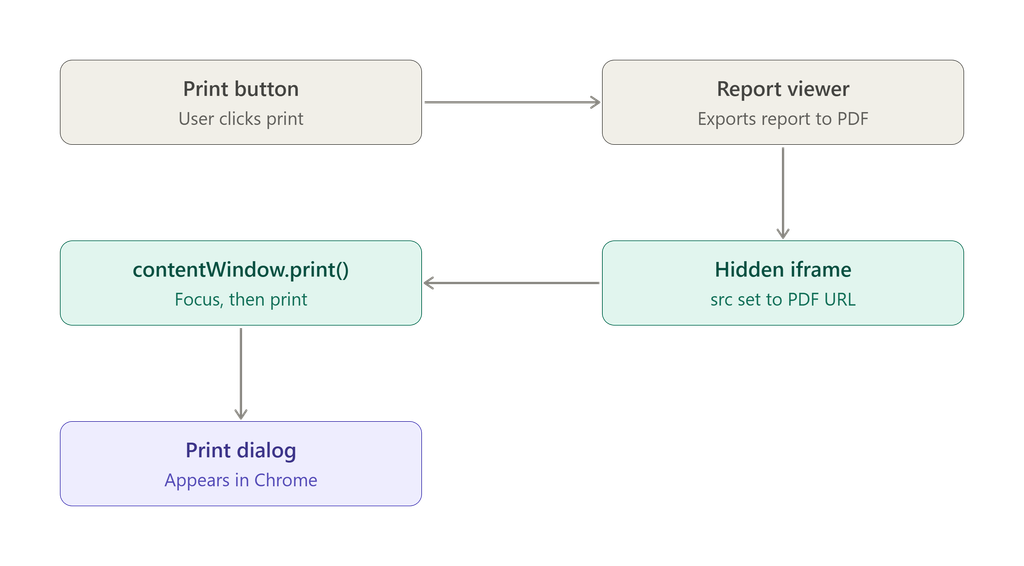
The Code
Add this script to the page that hosts the Report Viewer:
<script>
$(function () {

    var frame;

    window.telerikReportViewer.printManager.print = function printPdf(src) {

        if (!frame) {
            frame = document.createElement("IFRAME");
            frame.style.display = "none";
        }

        frame.src = src;
        document.body.appendChild(frame);

        frame.contentWindow.focus();
        frame.contentWindow.print();
    };

});
</script>
Step-by-Step Explanation
1. Wait for the DOM
$(function () { ... });
This is jQuery’s document-ready shorthand. It makes sure the page and the viewer’s script have loaded before the code runs, so window.telerikReportViewer exists when you try to override it.
2. Keep a single iframe reference
var frame;
The variable lives in the closure, outside the print function. The iframe is created once and reused on later clicks instead of piling up in the DOM.
3. Replace the viewer’s print function
window.telerikReportViewer.printManager.print = function printPdf(src) { ... };
The viewer exposes a printManager with a print method, and the viewer calls it when the user clicks the print button. Assigning your own function means the viewer now uses your logic. The src argument is the URL of the exported PDF.
4. Create a hidden iframe
if (!frame) {
    frame = document.createElement("IFRAME");
    frame.style.display = "none";
}
The first time through, the code creates an iframe and hides it. The user never sees it, because its only job is to hold the PDF so the browser can print it.
5. Load the PDF and print it
frame.src = src;
document.body.appendChild(frame);

frame.contentWindow.focus();
frame.contentWindow.print();
The iframe’s src is set to the PDF URL and the frame is added to the page. Calling focus() on the frame’s window matters, because browsers print the focused window. Then print() opens the browser’s print dialog for the PDF.
Suggested Improvements
The original snippet works in most popular browsers. If you hit timing problems, these refinements make it more robust. They are suggestions, so test them in your own environment.
Print after the PDF has loaded
Calling print() immediately after setting src can fire before the PDF is ready. Waiting for the frame’s load event is safer:
$(function () {

    var frame;

    window.telerikReportViewer.printManager.print = function (src) {

        if (!frame) {
            frame = document.createElement("iframe");
            frame.style.display = "none";
            document.body.appendChild(frame);
        }

        frame.onload = function () {
            frame.contentWindow.focus();
            frame.contentWindow.print();
        };

        frame.src = src;
    };

});
This version also appends the iframe only once, rather than on every click.
Guard against a missing viewer
If the script runs on a page where the viewer isn’t initialized, window.telerikReportViewer is undefined and the code throws. A simple check avoids that:
if (window.telerikReportViewer && window.telerikReportViewer.printManager) {
    // override print here
}
Common Pitfalls
Script order matters. The override must run after the viewer’s scripts load. Placing it at the bottom of the page, or inside the document-ready handler as shown, avoids undefined errors.
Same-origin restrictions. Browsers only allow contentWindow.print() when the iframe content is same-origin. If the PDF is served from a different domain or port, printing can be blocked.
Other browsers. The original workaround is reported to work in the most popular browsers, but test in the ones your users actually use, especially if they print often.
This is a patch. You are overriding an internal method of the viewer, so a future Telerik upgrade may change or fix this behavior. After upgrading, remove the override and test the built-in print button.