
JavaScript Performance Optimization: Advanced Guide
Introduction: The Real Cost of JavaScript
JavaScript performance optimization is no longer a nice-to-have. It is the most direct way to improve Core Web Vitals, because JavaScript is the most expensive byte you ship. A 200 KB image costs bandwidth and a decode. 200 KB of JavaScript costs bandwidth, then parsing, compilation, and execution, all on a main thread that also handles input and painting. On a mid-range Android phone, that work can run 5-10x slower than on your development laptop.
The metrics that expose this have matured. Interaction to Next Paint (INP) replaced First Input Delay as a Core Web Vital in March 2024, and it is far less forgiving. FID measured only the input delay of the first interaction. INP observes the full latency of nearly every interaction during the page’s life (input delay, event handler time, and the time until the next frame is presented) and reports roughly the worst one. A “good” score is 200 ms or less at the 75th percentile.
Its lab companion is Total Blocking Time (TBT), the sum of every long task’s time beyond 50 ms between First Contentful Paint and Time to Interactive. TBT is not a Core Web Vital, but it tracks INP well and is easy to enforce in CI.
Both metrics come down to one question: how long do you hold the main thread hostage? This guide attacks it from four angles: memory pressure, rendering work, scheduling, and what you ship in the first place. Each technique includes the anti-pattern and the optimized version, so you can apply effective JavaScript performance optimization to a real codebase today.
Memory Management and Garbage Collection
How V8 Manages the Heap
V8 uses a generational garbage collector. New objects are allocated in a small young generation (the nursery). A fast, parallel Scavenger collects it frequently; objects that survive are promoted to the old generation, which is collected by a Mark-Compact collector. Thanks to the Orinoco project, much of the old-generation marking is incremental and concurrent, running on helper threads. But not all of it: finalization, some compaction, and write-barrier overhead still touch the main thread.
Two practical consequences follow:
- Short-lived garbage is cheap; retained garbage is expensive. Allocating thousands of temporary objects in a hot loop mostly costs Scavenger time, but anything that accidentally survives gets promoted and lingers until a major GC.
- A leak is not just a memory problem. A growing old generation means longer and more frequent major GCs, which show up as jank and degraded INP over a long session.

Common Leak Patterns
1. Dangling event listeners. Removing a DOM node does not remove listeners attached to window, document, or long-lived emitters, and those listeners keep their closures (and everything the closures reference) alive.
// Anti-pattern: the listener on window retains `panel` forever
function mountPanel(panel) {
  const bigData = new Array(1000000).fill('x');
  window.addEventListener('resize', () => {
    panel.style.width = `${window.innerWidth / 2}px`;
    console.log(bigData.length); // closure captures bigData too
  });
}
The modern fix is AbortController, which lets one signal tear down any number of listeners:
// Optimized: a single abort() removes every listener tied to the signal
function mountPanel(panel) {
  const controller = new AbortController();
  const { signal } = controller;

  window.addEventListener('resize', () => {
    panel.style.width = `${window.innerWidth / 2}px`;
  }, { signal, passive: true });

  return () => controller.abort(); // call on unmount
}
2. Closures retaining more than you think. V8 shares one context object between closures created in the same scope, so a small callback can keep a large sibling variable alive.
// Anti-pattern: `report` is only used by the first closure,
// but the shared context can keep it alive for the second
function setup() {
  const report = buildHugeReport();
  const summarize = () => report.summary;
  const ping = () => console.log('ping');
  return { summarize, ping };
}

// Optimized: extract what you need so the large object can be collected
function setup() {
  const summary = buildHugeReport().summary;
  return {
    summarize: () => summary,
    ping: () => console.log('ping')
  };
}
3. Unbounded caches keyed by objects. A Map holds its keys strongly. When the cache is keyed by DOM nodes or other objects whose lifetime you don’t control, use a WeakMap.
// Optimized: entries disappear when the element is garbage collected
const metadata = new WeakMap();
function track(el, data) {
  metadata.set(el, data);
}
Reach for WeakRef and FinalizationRegistry sparingly. Finalization timing is non-deterministic, so never use it for correctness.
Hunting Leaks in Chrome DevTools
The Memory panel is your primary tool:
- Heap snapshot, compare mode. Take a snapshot, perform the suspect action (open and close a modal) several times, force a GC with the trash-can icon, then take a second snapshot. Switch to Comparison and sort by # Delta. Anything that grows by exactly the number of iterations is your suspect.
- Detached DOM nodes. Type
Detachedin the snapshot’s class filter. Nodes listed here are removed from the document but still referenced from JavaScript. The Retainers pane shows the exact reference chain. - Allocation instrumentation on timeline. Records allocations over time; blue bars that stay blue after GC are retained objects.
- Memory Inspector. For
ArrayBuffer,TypedArray,DataView, and Wasm memory, right-click the value in the Scope pane or Memory panel to open a hex view of the raw bytes. It is the right tool when you suspect buffer misuse rather than object retention.
Also keep the Performance Monitor (JS heap size, DOM nodes, event listeners) open while you interact. A sawtooth that never returns to its baseline is a leak.
Execution Speed and Rendering
Avoiding Layout Thrashing
Layout thrashing occurs when you interleave DOM writes (which invalidate layout) with DOM reads of geometry (which force the browser to recompute layout synchronously). Each iteration pays for a full reflow.
// Anti-pattern: read-write-read-write forces a reflow per item
function resizeAll(items) {
  items.forEach(el => {
    const w = el.parentElement.offsetWidth; // read: forces layout
    el.style.width = `${w / 2}px`;          // write: invalidates layout
  });
}

// Optimized: batch all reads, then all writes
function resizeAll(items) {
  const widths = items.map(el => el.parentElement.offsetWidth);
  items.forEach((el, i) => {
    el.style.width = `${widths[i] / 2}px`;
  });
}
Where possible, avoid geometry reads altogether. ResizeObserver and IntersectionObserver deliver size and visibility data without forcing synchronous layout.
requestAnimationFrame and DOM Batching
requestAnimationFrame (rAF) runs your callback just before the next paint, which is the correct place for visual writes. Coalesce frequent events into one update per frame:
// Anti-pattern: DOM work on every pointermove (can fire faster than the frame rate)
window.addEventListener('pointermove', e => {
  cursor.style.transform = `translate(${e.clientX}px, ${e.clientY}px)`;
});

// Optimized: store the latest value, write once per frame
let x = 0, y = 0, scheduled = false;
window.addEventListener('pointermove', e => {
  x = e.clientX; y = e.clientY;
  if (scheduled) return;
  scheduled = true;
  requestAnimationFrame(() => {
    cursor.style.transform = `translate(${x}px, ${y}px)`;
    scheduled = false;
  });
}, { passive: true });
For inserting many nodes, build off-document and attach once:
// Optimized: one insertion, one layout pass
const frag = document.createDocumentFragment();
for (const row of rows) {
  const li = document.createElement('li');
  li.textContent = row.label;
  frag.append(li);
}
list.replaceChildren(frag);
For long, mostly off-screen lists, add content-visibility: auto with contain-intrinsic-size in CSS so the browser skips rendering work for offscreen sections.
Debouncing vs. Throttling
They solve different problems, and mixing them up is a common source of sluggish UI:
- Debounce waits until events stop for N ms, then fires once. Use it for search-as-you-type and validation, where only the final value matters.
- Throttle fires at most once per N ms while events continue. Use it for scroll or resize handlers that need periodic feedback.
- rAF coalescing is effectively a throttle aligned to the display refresh. Prefer it for anything visual.
const debounce = (fn, ms) => {
  let id;
  return (...args) => {
    clearTimeout(id);
    id = setTimeout(() => fn(...args), ms);
  };
};

const throttle = (fn, ms) => {
  let last = 0;
  return (...args) => {
    const now = performance.now();
    if (now - last >= ms) { last = now; fn(...args); }
  };
};
Keep the handler itself cheap: INP counts handler time. Do the minimum needed to update the UI, then defer the rest.
Modern Async and Concurrency
Optimizing async/await Chains
await is sequential by default. Independent work should start together:
// Anti-pattern: waterfall, total time = a + b + c
const user = await fetchUser(id);
const posts = await fetchPosts(id);
const prefs = await fetchPrefs(id);

// Optimized: concurrent, total time = max(a, b, c)
const [user, posts, prefs] = await Promise.all([
  fetchUser(id), fetchPosts(id), fetchPrefs(id)
]);
Use Promise.allSettled when partial failure is acceptable, and pass an AbortSignal to fetch so stale requests are cancelled instead of processed.
Microtasks vs. Macrotasks
After each task, the engine drains the entire microtask queue (promise reactions, queueMicrotask) before rendering or running the next macrotask (setTimeout, UI events, message events). That makes microtasks great for ordering and terrible for long work: a promise chain that keeps scheduling more promises can starve rendering and input just like a synchronous loop.
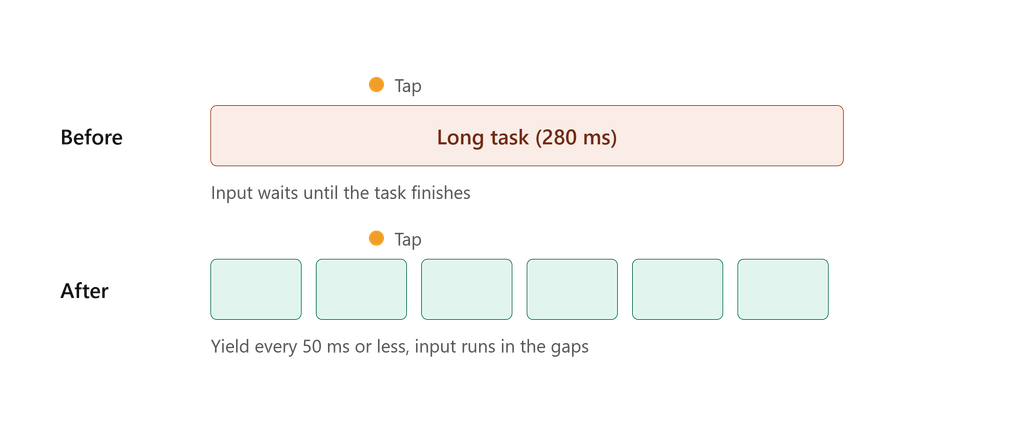
// Anti-pattern: processing 100k items in one task, with no chance to yield
async function processAll(items) {
  for (const item of items) await heavy(item); // awaits on resolved work still run as microtasks
}

// Optimized: yield to the main thread periodically
const yieldToMain = () =>
  globalThis.scheduler?.yield
    ? scheduler.yield()
    : new Promise(resolve => setTimeout(resolve, 0));

async function processAll(items) {
  let deadline = performance.now() + 40;
  for (const item of items) {
    heavy(item);
    if (performance.now() > deadline) {
      await yieldToMain();
      deadline = performance.now() + 40;
    }
  }
}
scheduler.yield() is available in Chromium-based browsers and, unlike setTimeout, it continues your task ahead of other queued tasks after yielding. The setTimeout fallback keeps the code portable. Breaking work so that no task runs much longer than 50 ms is the single most effective INP and TBT fix.
Web Workers for Heavy Compute
Yielding keeps the main thread responsive but still spends its time. Genuinely CPU-bound work (parsing large payloads, image processing, diffing, search indexing) belongs in a Worker.
// main.js
const worker = new Worker(new URL('./parse.worker.js', import.meta.url), { type: 'module' });

function parseOffThread(buffer) {
  return new Promise((resolve, reject) => {
    worker.onmessage = e => resolve(e.data);
    worker.onerror = reject;
    worker.postMessage(buffer, [buffer]); // transfer, don't clone
  });
}

// parse.worker.js
self.onmessage = ({ data }) => {
  const result = expensiveParse(new Uint8Array(data));
  self.postMessage(result);
};
The second argument to postMessage is a transfer list: ownership of the ArrayBuffer moves to the worker with zero copy. Without it, the structured clone itself can become the bottleneck. Libraries such as Comlink wrap this in a promise-based RPC interface if you prefer. Remember that workers have no DOM access, and each one has startup and memory costs, so pool them rather than spawning per task.
Bundling and Loading Strategies
The fastest JavaScript is the JavaScript the user never downloads.
Tree-Shaking That Actually Works
Tree-shaking relies on static ESM analysis. It silently fails when modules are CommonJS, when imports are dynamic, or when the bundler can’t prove side-effect freedom.
// Anti-pattern: pulls in the whole library (or its barrel file)
import _ from 'lodash';
import { formatDate } from './utils'; // barrel file re-exporting 80 modules

// Optimized: import precisely what you use
import debounce from 'lodash-es/debounce';
import { formatDate } from './utils/formatDate';
For your own packages, set "sideEffects": false (or list the files that do have side effects) in package.json, and ship ESM. Audit regularly with source-map-explorer or your bundler’s visualizer; large surprises are usually one careless import.
Code-Splitting and Dynamic Imports
Split by route first, then by interaction: code behind a click should not be in the initial bundle.
// Anti-pattern: charting library is parsed on every page load
import { renderChart } from './chart';
exportBtn.addEventListener('click', () => renderChart(data));

// Optimized: load on demand, prefetch on intent
let chartModule;
const loadChart = () => (chartModule ??= import('./chart.js'));

exportBtn.addEventListener('pointerenter', loadChart, { once: true });
exportBtn.addEventListener('click', async () => {
  const { renderChart } = await loadChart();
  renderChart(data);
});
Caching the promise ensures one network request regardless of how many triggers fire.
Modern Module Optimization
- Ship native ES modules to modern browsers and use
<link rel="modulepreload">for critical dependency chains so the browser doesn’t discover them one waterfall at a time. - Use
deferortype="module"(deferred by default) for scripts. Avoid synchronous scripts in the head. - Move non-critical third-party scripts after interaction or idle time, and treat them as the first suspects when INP regresses. You don’t control their long tasks, but you control when they load.
- Set a performance budget (for example, under 170 KB of compressed JS for the critical route) and fail CI when it is exceeded.
Conclusion and Actionable Checklist
Optimization in 2026 is less about micro-benchmarks and more about respecting the main thread. Measure with real-user INP data first (the web-vitals library or CrUX), reproduce in DevTools with CPU throttling, and fix the longest tasks and largest retainers before anything else.
Three Rules of Thumb
- No task longer than 50 ms. Break up long work with
scheduler.yield(), move CPU-bound work to Workers, and keep event handlers minimal. Do the visual update first and defer everything else. - Everything you attach, you detach. Tie listeners, observers, and fetches to an
AbortController, preferWeakMapfor object-keyed caches, and verify with a before/after heap snapshot. - Ship less, load later. Import narrowly, split by route and by interaction, and enforce a budget so regressions fail the build instead of reaching users.
Quick Audit Checklist
- Is real-user INP at or below 200 ms at p75?
- Are there long tasks over 50 ms in the Performance panel on a throttled CPU?
- Do repeated user flows leave the JS heap and detached DOM nodes flat?
- Are DOM reads and writes batched, with visual updates inside rAF?
- Are independent awaits running through
Promise.all? - Does the initial bundle exclude code only used behind interactions?
Profile, change one thing, and measure again. The numbers, not intuition, decide what ships.
Leave a Reply